Layouts and typos
Russian and English candidates are checked against Hunspell dictionaries while you type. This corrects input; it does not translate between languages.
 Yuqora
Type in the language of your thoughts.
A typing assistant for people working between Russian and English. Keyboard layouts, typos and personal rules, together in one app.
Early version 0.1.29 · Windows · RU ↔ EN
It does not rewrite your thoughts. It checks typed words against dictionaries and rules, and may leave ambiguous cases unchanged.
Russian and English candidates are checked against Hunspell dictionaries while you type. This corrects input; it does not translate between languages.
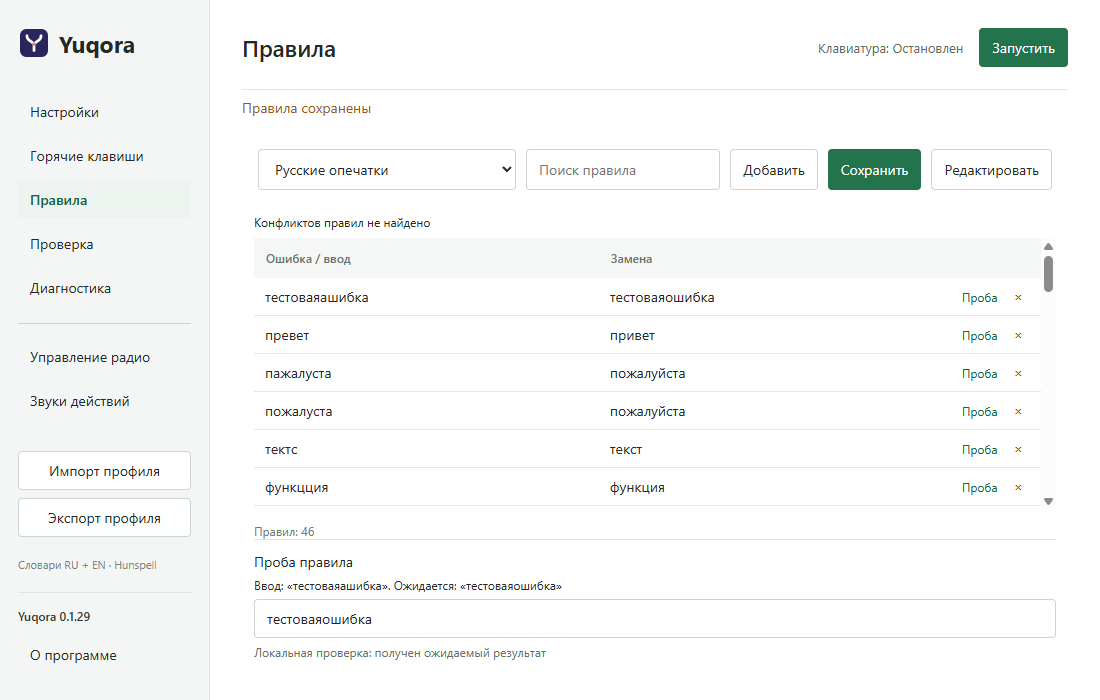
Create, edit and delete replacements. Check conflicts and try a rule in a dedicated field. Configure keyboard shortcuts in the interface.
JSON command groups support HTTP requests and webhooks, sounds, and launching programs or scripts. A group and command editor is built into settings.
Diagnostics for the input worker, dictionaries and errors. Undoing the last automatic replacement and temporary exclusions help keep you in control.
AutoHotkey comes bundled with the app; no separate installation is needed. Corrections run locally, without sending typed text to a neural network.
We do not claim Yuqora is faster or more accurate than competitors: no shared benchmark has been run. These are documented capabilities, not rankings.
| Product | Documented capabilities | Points to consider |
|---|---|---|
| Yuqora 0.1.29 | RU/EN dictionary correction, rule editor, diagnostics and JSON commands. | Early Windows version. Neural models and Linux are not part of the current product. |
| Punto SwitcherSource ↗ | Automatic layout switching and configurable replacements. | Shares Yuqora’s core task of correcting keyboard layouts. |
| Caramba Switcher ProSource ↗ | Windows and macOS; automatic layouts, RU/EN typos, exceptions and sounds. | Pro already corrects typos; this is not unique to Yuqora. |
| EveryLangSource ↗ | Layout switching, spell checking, translation, OCR and clipboard tools. | A broader text toolkit. Yuqora does not implement translation or OCR. |
| SimpleSwitcherSource ↗ | Correction of typed or selected text, flexible hotkeys and launch commands. | Other products have commands too. Yuqora uses editable JSON groups. |
| dotSwitcherSource ↗ | Keyboard-layout correction of typed text using a hotkey. | A manual workflow; Yuqora also attempts automatic correction. |
| LangOverSource ↗ | Converting text to another layout with F10 and changing case. | Layout conversion should not be confused with typo correction. |
| XNeurSource ↗ | Automatic and manual layout switching in Linux, documented for RED OS 7.3. | Yuqora has no Linux build yet. XNeur compatibility depends on the environment. |
Sources checked on 16 October 2026. Descriptions cover the named products and editions, are not exhaustive and may change. An omitted feature does not imply its absence. Product names belong to their owners.
Mahou and Key Switcher were also considered. Current features and editions could not be reliably verified from accessible primary sources for this publication, so no ratings or claims about their limitations are made here.
Our focus is control: dictionary correction, testable personal rules, diagnostics and separate JSON commands in one interface. This is a particular combination of features, not a claim of exclusivity or superiority.
Directions for development, not delivery promises. Available features are listed above.
Prototypes are compared with the current algorithm on an error corpus. They are not connected to live typing.
Remember the input language when switching between chats, editors and terminals.
Debian, RED OS and other environments need separate implementation and testing. No builds are available yet.
Opt-in exercises based on errors in a dedicated training field, without recording conversations.
No. Dictionary corrections run on your computer. However, HTTP commands you configure can access the network. Only load trusted JSON files and scripts.
Russian and English for now. The four website languages do not imply Spanish or German support in the input worker.
Limited free and extended paid editions are under consideration. Pricing and final license terms have not been announced.
Contact us for a test build. A public release catalogue and updates through the website are planned but not operational yet.
Yuqora is pronounced “Yu-kora”. Inspired by 语桥 (Yǔqiáo), the image of a language bridge, it is an independent name, not a Chinese word or a literal translation.
Author and developer: MirBoss
Moscow, Russia